 Agentic Commerce
Why it's every agent's first move
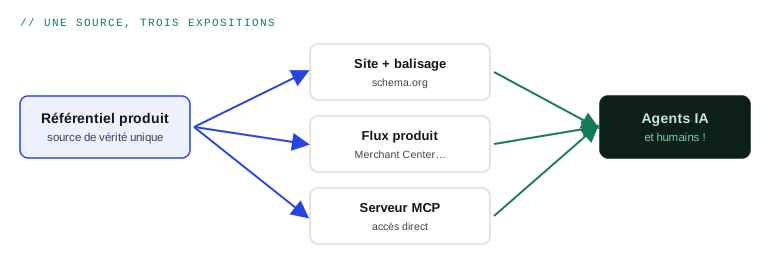
When an agent lands on a product page, it doesn't “look” at your layout: it looks first for schema.org markup. That's the machine version of the page, the one feeding comparisons — and, for years now, Google's rich results. Complete, accurate markup means being understood; missing or wrong markup means asking the agent to guess. It doesn't guess: it moves to a competitor.
The core: Product, Offer, Organization
Three types cover the essentials of a merchant site:
- Product — the item: name, reference (sku, gtin), brand, description, attributes.
- Offer — the commercial offer: price, currency, availability, delivery and return terms. The part agents scrutinise most.
- Organization — the merchant: identity, contact details, customer service. The raw material of trust.
MINIMAL EXAMPLE — B2B PRODUCT PAGE
{
  "@context": "https://schema.org",
  "@type": "Product",
  "name": "18V Pro cordless drill",
  "sku": "PV18-PRO",
  "brand": {"@type": "Brand", "name": "Fabrix"},
  "offers": {
    "@type": "Offer",
    "price": 89.00,
    "priceCurrency": "EUR",
    "availability": "https://schema.org/InStock",
    "priceValidUntil": "2026-12-31",
    "eligibleQuantity": {"@type": "QuantitativeValue", "minValue": 6}
  }
}
Extend it to your content: FAQPage on frequently asked questions, Article on the blog, BreadcrumbList everywhere, and DefinedTerm if you publish a glossary — generative engines love those.
The five costliest mistakes
- Markup price differs from displayed price. The inconsistency is detected, and your whole credibility is downgraded.
- Availability never updates. Permanent InStock over real stockouts means agentic transactions will fail.
- Marking up only part of the catalog. To an agent, unmarked products are second-class products.
- Ignoring B2B fields. Minimum quantity (eligibleQuantity), net prices, packaging: without them your professional offer is unreadable.
- Marking up wrong data. Markup amplifies what it structures — errors included. Repository clean-up always comes first.
Method and validation
- Generate the JSON-LD dynamically from your product database — never by hand, never hard-coded.
- Validate with Google's Rich Results Test and the schema.org validator, on a sample of every page template.
- Monitor in Search Console: markup errors surface there continuously.
- Audit consistency across markup ↔ page ↔ feed: all three must tell exactly the same story.
READ NEXT
Guide 3: agentic commerce in B2B
→